
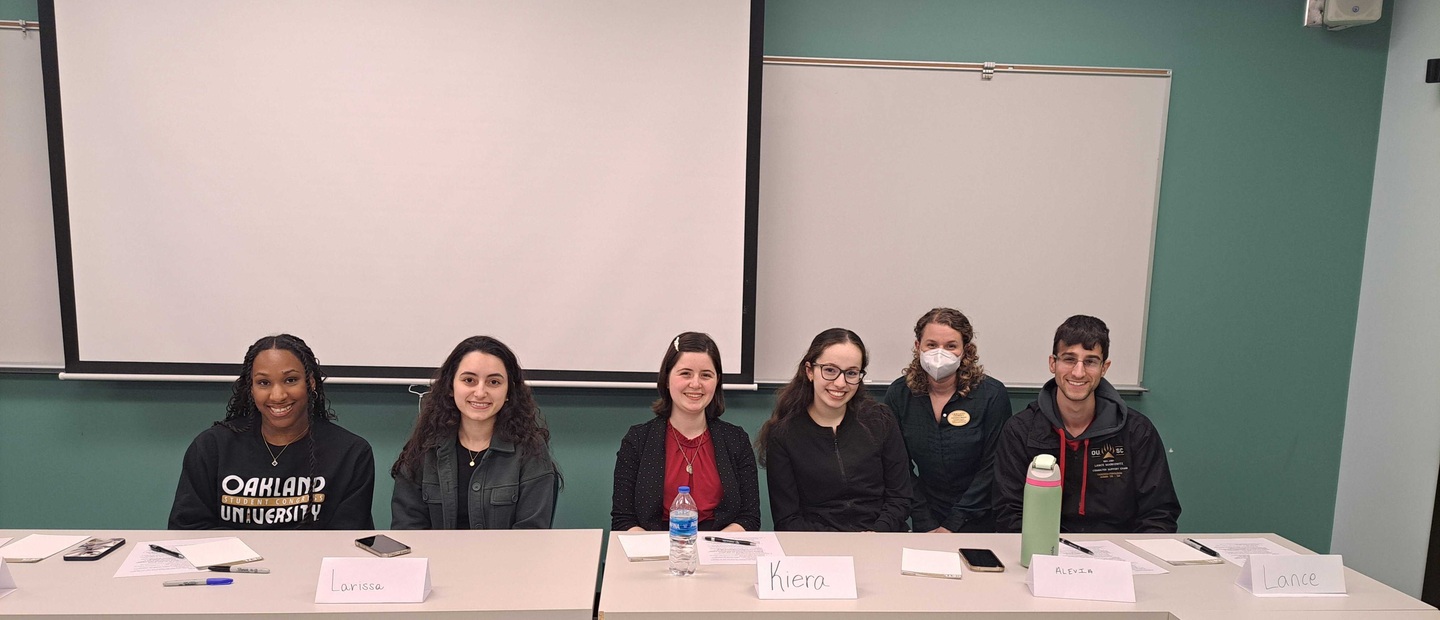
Student Perspectives on Navigating Difficult Discussions
In an ongoing student engagement collaboration with OU Student Congress’ Lance Markowitz, we hosted the third annual student panel, this year’s theme being “navigating the tough topics.” As an extension of this event, we invited those involved in the panel to share their takeaways, key ideas, and hopes for the future as far as facilitating intentional, meaningful discussion on topics that matter. Watch the panel event recording, and tune in to future efforts on cultivating student-faculty collaborations in teaching and learning.
Building Rapport Before Facilitating Discussions
Lance Markowitz, Senior, Spanish and General Management Major, Student Congress CETL Liaison, Panel Co-moderator
The student panel helps kickstart communication between faculty and students, but the ultimate goal of this event is to facilitate ongoing dialogue. Students will share their input when they feel comfortable, and one way to increase comfortability is through rapport-building. Building rapport increases student buy-in and helps lead to more meaningful learning. While building rapport may seem daunting, there are so many simple strategies that show students you care. Introducing yourself and discussing your personal and professional background help students put a story to a face. Additionally, learning students’ names and asking for their feedback are small gestures that show us you care. Even just encouraging respectful disagreements during classroom conversations helps bring normality to discussing grey issues. Thank you to all who were able to attend this year's panel and please don’t hesitate to reach out so we continue these conversations ([email protected]).
Keeping an Open Mind
Larissa Giacomin, Junior International Relations Major and French Minor, Treasurer of OU Model UN Team and Secretary of Pi Sigma Alpha
People’s perceptions of what difficult conversations are and how they should go can vary, but cutting people off right off the bat is not the way to go. Keeping an open mind to what people have to say may teach us something valuable. So, allowing at least the initial stages of difficult conversations can host a friendly and safe environment for students to grow and learn. That being said, it is crucial that professors are skilled to navigate and direct such conversations. Professors framing issues as questions or debates while remaining impartial is just as important as students listening attentively and remaining respectful while sharing their opinion. Human interaction is never one-sided, and it is everyone’s job to make sure that those around us feel respected and included when engaging in difficult conversations.
Strategies Across a Skill Spectrum
Christina Moore, CETL Associate Director, Panel Co-moderator
The student-led panel planning committee intentionally selected diverse student panelists based on their majors, identities, perspectives, and other factors, which resulted in different opinions on the questions presented. Some preferred faculty avoid controversial topics while others saw them as integral to authentic learning. Some felt conversations dragged on too long while others felt cut-off and silenced. The panelists provided essential context for their experiences such as family history, educational expectations, and whether they were often the only or few of a particular identity or viewpoint.
Controversial topics and difficult discussions can’t always be avoided
Student may bring them up; a problematic comment may come up in discussion or in a class text; or a current event may require addressing the topic. In these moments, it’s good to know what your level of preparedness is, and respond in a way that acknowledges students even if you aren’t ready to have a whole class discussion. (e.g., "I want to make sure this discussion gets the attention it deserves. Let's talk more at office hours, or we can find another time.")
Anticipate and plan
What controversial events relate to your course or are likely to affect your students? What level of response is appropriate? How can you make students feel heard even if you’re not adept at facilitating potentially heated conversations?
During last year’s discussion on Teaching through Tragedy and Conflict, Dr. David Schwartz said sometimes it’s appropriate to simply acknowledge how people may be feeling about an incident, what relevant support is available on campus, and continue with class accordingly.
If you want students to practice discussion difficult conversations, set specific parameters and ground rules, whether that is an amount of time for the conversation, how to focus on generative outcomes. Our blog post Managing Difficult Moments provides concrete actions to build these discussion skills.
You can also always meet with us to talk through a scenario or plan, or reach out to the Dean of Students, Counseling Center, or other experts on campus depending on the nature of the discussion or potential conflict.
Save and adapt a Google Doc version of this teaching tip.
Others may share and adapt under Creative Commons License CC BY-NC. View all CETL Weekly Teaching Tips. Follow these and more on Facebook, Twitter, and LinkedIn.

Our Caravan to ADA Compliance Using Moodle’s Accessibility Tools
Back in 2018, Christina Moore (CETL), Dan Arnold (e-LIS), and I researched digital accessibility standards for online teaching and learning. Digital accessibility ensures web content is usable for all people, including users with visual, auditory, mobile, and other types of disabilities. We developed a series of workshops to introduce faculty to proactive habits for creating accessible videos, documents, and other types of course content.
As a lecturer and instructional designer over these years, I can say that it has never been easier than today to get started. In terms of making your Moodle course digitally accessible and compliant with ADA Title II regulations, this teaching tip is a starting point.
Change starts with the person in the mirror
You may be surprised to read that hundreds of accessibility errors were found in my Moodle courses. “What? An Instructional Designer with over 15 years of experience?” Yes.
To our benefit, Moodle makes fixing course page accessibility much easier than it was for us in 2018. By using the Brickfield Accessibility+ Review block in Moodle, you’re able to quickly identify and correct any accessibility errors on your Moodle course page.
User Experience: Brickfield Accessibility Review
New Kid on the Block
Current courses have the Accessibility+ Review block already added to your courses. There’s a blue button “submit for analysis” in that block that begins the process. It could take some time for that to produce results. Once it does, you’ll have a list of categories and how many errors are associated with it.
Bulk Fixing for the Win
With accessibility, it’s easy to feel overwhelmed before you actually start fixing it. “I can’t believe I have SO many errors.” The accessibility report allows you to Go to Wizards, which allow you to submit bulk fixes to many of the errors it detects. Many of the errors in Moodle can be fixed with the click of a button. Any one of the tabs shows all the errors on a scrollable list, and the bottom of the page allows you to Submit Bulk Fixing.
Finding this new power in the accessibility report gave me a fleeting sense of invincibility! Knowing the rest of the journey won’t be as quick as bulk fixing, these easy “wins” like this certainly gave me the confidence to forge ahead. I was on my way.
Finding “the Why” in Accessibility
Going through the Wizard, I will admit that I didn’t agree with one of the recommended fixes at first. For years, I had the personal preference of setting all of my links and URLs to open in a new tab. This, however, was identified as an accessibility error. I was able to correct these errors via bulk fixing, but I really wanted to know why I was “doing it wrong” when I really preferred the way I was doing it. In the Wizard, each category has a little question mark icon that when clicked provides a popup with a clear explanation on what the error is, why it is an error, and why fixing it makes it better.
Manual Fixes Are Easy Too
Brickfield can open a category of fixable issues that you can fix all on one page. For instance, a list of all images that need alt text. You can type in a box next to each image on the Brickfield page without navigating away to edit the original source. Even though it’s not as fast as Bulk fixing, it is worlds faster and a more organized approach to making these fixes than we would have without this tool.
The Help Doc DID help
e-LIS developed a guide for using Brickfield that goes into much more detail. It talks about how the block can toggle your course page to view individual links on the course page and color them red, orange, or green based on the accessibility evaluation of each link. I found the block to be intuitive overall, but reviewing the doc (or having it handy) allowed me to consider some details or double-check some specific areas where I might not have known to take a pause. For example, Bulk Fixing some areas like ALL CAPS take some review to make sure I’m not automatically changing the letter case of an acronym that should stay in all caps.
The Goal
With Brickfield, you’ll constantly see the number of errors in the block. The goal is to make them all zero. I just chipped away at it over a few days. With all the errors I had in my course, it probably would have taken me an hour or two in one sitting. It feels good to see the current number of remaining errors diminish. Anything new I added to my course will be scanned, so I continue to look at that block periodically.
Conclusion
When your Moodle course page is compliant, you’ve taken a positive first step in your own journey toward compliance in your online course. Know that as we all caravan toward compliance, you’re not alone. In addition to 1-on-1 guidance from e-LIS, we also developed an ADA Title II Compliance eSpace that not only covers using Brickfield, but also guides you through the next steps in your accessibility journey: making your files and videos compliant. In other words, Brickfield doesn’t fix everything. However, the ease and speed when starting with Brickfield gives you the momentum to dive into the other areas of accessibility. While on this journey, you may even learn a thing or two about yourself.
Save and adapt a Google Doc version of this teaching tip.
About the Author
Dr. Nicholas Bongers is the Senior Instructional Designer at e-Learning & Instructional Support at OU. Nic is also a Lecturer for the School of Business and the Honors College. He has been in the instructional design field for 17 years, just recently completed a digital marketing certificate. Nic invests his time outside of work learning Polish, advising the OU Football Club, and playing live music in a KISS Tribute band.
Photo by Kevin Schmid on Unsplash. Others may share and adapt under Creative Commons License CC BY-NC.

